First, what is alt text?
Alt text, or alternative text, is a short description added to an image that tells people (or a search engine) what’s in the picture. It’s tucked away in your website code, so it’s usually only accessed by people using screen readers or by page crawlers, which search engines use to learn what your page is about. But alt text may occasionally be seen by a wider audience if images aren’t loading – for example, if someone has slow internet or switches off images to save data.
Note, alt text is different to image descriptions or captions (sit below an image, visible to everyone, can be more descriptive, less rules). Both are helpful, but in this post, we focus on alt text for three reasons: Alt text is specifically designed to be read by assistive technology; not everyone’s website is set up for image captions; and because Google says that alt text is the single most important element for adding more metadata to an image.
Why it's worth taking the time to write alt text
Alt text improves accessibility
If you’ve made the effort to add images to your content, then you already know the value they have for engagement. Images offer extra layers of meaning, communicate brand identity, and give rhythm to the page flow. Alongside engaging website design, well-chosen visuals and accessible content help create a more intuitive experience that keeps users connected with your brand.
Alt text is a simple way to include more people in this experience. There are around 2 million blind and partially sighted people in the UK, and around 4 in 10 use the internet every day, according to The Royal National Institute of Blind People. Alt text provides context and visual meaning that might otherwise be unavailable.
Alt text improves SEO
It’s not just your human readers who appreciate well-described images; search engines love them too. While Google’s AI has gotten incredibly smart at “reading” images, it still relies heavily on alt text to truly understand the context and “why” of your content.
Think of alt text as a direct line to Google’s crawlers. By providing clear, keyword-relevant descriptions, you’re helping search engines index your content more accurately. This is your golden ticket to Google Images, which historically accounts for over 20% of all web searches (SparkToro).
And with the rise of multimodal search, where users search using a mix of text, voice, and even camera snaps via Google Lens, alt text acts as the essential bridge between your visual media and the searcher’s intent. Without it, your images are invisible to the billions of visual searches happening every month.
Google rewards accessibility
Google has long been vocal about the fact that user experience is a primary ranking factor. Because alt text improves accessibility, it inherently improves the quality of your site, and Google rewards that. When your site is easy to navigate for everyone, your engagement metrics improve, sending a clear signal to search engines that your page is a high-quality destination.
In short, accessibility and SEO shouldn’t be seen as being in conflict. There is a large overlap between best practices for both, with several easy ways to make your website more accessible and benefit SEO.
5 tips for writing better alt text (with examples)
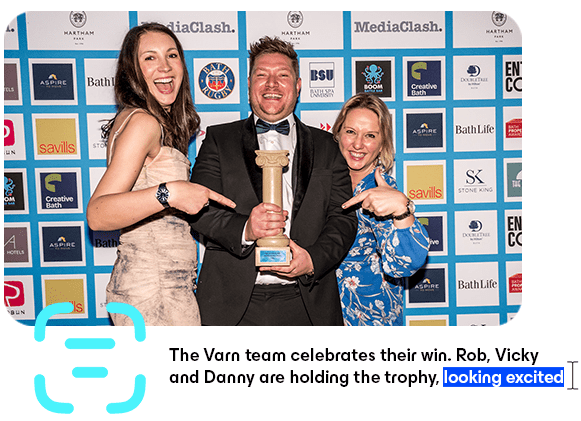
We’ll be using this photo of our team winning a trophy at the Bath Life Awards (left) to demonstrate best practice for alt text.
1. The first rule: Throw out the rules
Okay, perhaps we don’t need to throw out the rules completely. But certain guidance should be taken as a generalisation rather than a hard rule. For example, many guides online will tell you that alt text should be 125 characters, describing only the most relevant details. This is fine as a rule of thumb. But delve into the preferences of people who use screen readers and they’ll tell you it’s just not that simple.
For a start, the 125 character count is based on how screen readers used to work. But today, as one Redditor explains, “[alt text] should accurately describe what is in the image, no more, no less.” If you can convey the meaning in 50 characters, perfect. This might be the case for a simple, informational image. But let’s say you’re dealing with an artistic, emotionally complex image – you may well need double the recommended character count to get at its expressive qualities.
Also consider that the aim of alt text is “to be a text representation of what the image was trying to convey, which may not always be a description of the image.” (R/accessibility). “Hand holding up two fingers” might describe an image. But the important context is that it’s a hand making a peace sign, and that’s the bit you need to write.
The examples below will give you a clearer idea of how these suggestions can play out in practice. We’ve used a Varn image as an example.

Here’s a photo of our team at a recent awards event. The alt text could just describe the elements of the image:
- ‘Three people holding a trophy.’
This is acceptable. The accompanying article probably gives enough context. But what this alt text doesn’t do is communicate the emotional tone of the picture. For example:
- ‘Three people holding a trophy, smiling and celebrating.’
This is accurate, concise, and shares the feeling. But it still lacks contextual precision — going by the alt text alone, it could be a stock image of anyone holding up a trophy at an awards event. We’ve missed the detail that it’s a company team photo.
- ‘The Varn team celebrates their win. Rob, Vicky and Danny are holding the trophy, looking excited and happy.’
2. Know what to leave out
There are a few things that commonly show up in alt text when they ought not to:
- ‘An image of’ or ‘A photo of’ — the screen reader automatically says this when it reads the alt text, so if you add it then it will announce “An image of an image of…”
- Photo credits — These should be included in the caption, not the alt text
- Copyright or trademark symbols — As above
- Alt text for decorative images — images that do not provide any functional or informational value, such as a swirl, should be left with blank alt text
- Redundant text — Try to avoid adding information that is already clear in the surrounding context (more on this in the example below)
- Excessive keywords — Include a keyword if it helps accurately describe an image, sounds natural and aligns with typical search terms; beyond that the SEO is best left to the surrounding content
We’ll return to our Varn photo example to illustrate the idea of redundant text.
Given we said context is important, you may have wondered why we didn’t add even more — something like:
- ‘Varn celebrates winning the Bath Life Awards Best Business Service. Rob, Vicky and Danny are holding the trophy, looking excited and happy.’
If this were a standalone image, it might be a good idea. But it’s most likely appearing on a news announcement about the awards. The surrounding context of the image (i.e., the article or social media post) will make it abundantly clear that this is the Bath Life Awards and that we won the Best Business Service. Making screen reader listeners sit through such a long phrase in the alt text is unnecessary and could be considered a poor user experience. It’s a tricky balance, and hopefully our fifth tip will help you find the line between helpful and overbearing alt text.
Keywords should be present in the surrounding content to give context already, and this is a good opportunity to check that is the case. For example, we’d expect the keywords ‘Bath Life Awards’, its modifier ‘Best Business Service’, and the company name, ‘Varn’, to appear in the H1 and body copy for a news article covering the win.
3. Curate it for the context
Context, context, context. It’s so important for alt text that we’ve made it an individual guidance point as well as mentioning it in all the other tips. But here, we’re going to use an example to explore how the context can radically change the alt text.
Back to our Varn awards picture. Lets say that a local designer called Petal & Hem made the dresses that Danny and Vicky are wearing. The designer wants to share the image to their social media. It’s the same image, and yet the alt text is going to be completely different.
It could say something like:
- ‘Two customers wearing Petal & Hem dresses to an Awards ceremony: The blue flower print midi dress and our new pastel body con.’
Or perhaps the designer has a certain personality and tone of voice on social media. They can use it to create a gently branded alt text experience, like:
- ‘Two of our favourite customers all dressed up for an awards ceremony in Petal & Hem — Vicky in our blue floral midi dress and Dani in our pastel bodycon dress.’
(Note, these alt text suggestions are assuming that our imaginary Petal & Hem poster hasn’t already written this information in their Instagram caption).
4. Use keywords appropriately
From an SEO perspective, you want to include keywords in the alt text if at all possible. This will help show to search engines which searches it is relevant for, which in turn helps users find relevant content. Focus on naturally including relevant keywords (such as product name, colour, and occasion) within a clear, accurate description of the image. Avoid keyword stuffing or overly sales-driven language — alt text should read like a helpful sentence rather than an advert. If it sounds natural when read out loud by a screen reader, you’re on the right track.
Keyword research can help you define the best phrases for alt text. For example, for an ecommerce site, there might be lots of different ways to describe a product. If we know about the search intent that brings people to a page we can choose the most relevant descriptors. If we know that lots of people search for dresses using colour and style modifiers, we can describe a ‘peach coloured bodycon midi dress’ rather than a ‘sleeveless fitted cocktail dress’ (assuming both are accurate descriptions of the image). Both are accurate, but one will be better for SEO.
Extra tip: Aligning images and keywords
As tempting as it can be for SEO, it’s important to only include details that are actually visible in the image; don’t add keywords for things that aren’t shown. There’s a line between using keywords to hint at context, and falsely stating something is in the image when it isn’t. False alt text can hurt SEO because search engines rely on it to understand what’s actually in an image. Misleading descriptions reduce relevance and may lower the content’s value in search results.
Turning this on its head, if keywords don’t make a good description of the image, consider whether there is a different image you can use instead that would allow you to include them more appropriately. This approach places emphasis on ensuring your chosen images provide value for search and users.
5. Test it out with a screen reader
One simple but often overlooked tip: read your alt text out loud using a screen reader or text-to-voice. Experiencing it this way helps you step into the shoes of someone relying on it, and immediately shows whether it’s clear and conveys the right meaning. You’ll notice if anything feels confusing, too long, or if your phrasing lands awkwardly. It’s also a great way to check that your context hints aren’t accidentally misleading. Things should sound natural and informative.
In short, thoughtful alt text improves accessibility for all users while supporting search engines in understanding your content. Factoring in the SEO benefits of accessible web content makes it well worth your time to describe images clearly, accurately, and with context.
Our team of technical SEO specialists can help you optimise your website for both search engines and users. Get in touch with our experts to discuss your SEO challenges — we’d love to support you and help your site perform at its best.

Do you need SEO expertise to get visible online?
Get in touchYou might also be interested in...

Content Strategy, SEO Strategy 05.02.26
How to write and review E-E-A-T SEO content
Read more
Article by: