At the start of June, Google announced new opportunities, controls, and insights for site owners. Among these updates is a toggle in Google Search Console that will start to be rolled out from the 17th July, which allows you to prevent your content from being used and cited in Google’s AI Mode, AI Overviews, and Discover features.
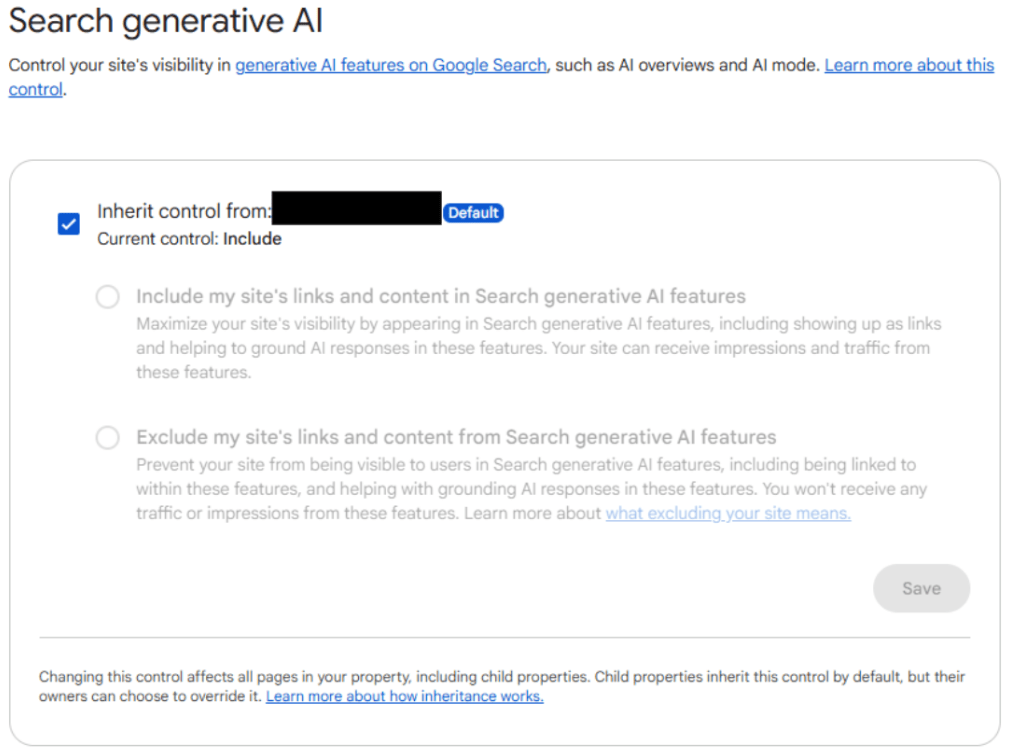
This blog explores this toggle, explaining what it does, why you may opt out, and its pros and potential cons.
What does the Google Search Console toggle do?
Based on feedback from website owners, particularly publishers, Google has been trying to make sure site owners have greater permissions and control over their site. This includes how sites appear in AI responses and how they are used by AI features.
In doing so, one of the updates Google has started rolling out recently is a toggle in Search Console, which allows site owners to decide whether they want their content to appear in its generative AI features. These features include AI Overviews, AI Mode, and Discover, but Gemini is not included.
If you were to click Disable, this means you would be opting your content out of being used by Google’s AI features. As a result, your site will not receive any traffic or impressions from Google’s generative AI features. For most sites, this toggle visibility in AI features is crucial to compete in AI search, but this could be a consideration for some site owners.
Why would a site opt out of Google AI features?
Some examples of sites that may want to make use of this feature include publishing sites, who want to encourage users to click through to the site and read the full article, rather than just read a summary in AI Overviews. Once on the site, a user is more likely to read related articles and explore.
Another example is healthcare and pharma websites that do not want their sensitive content and information to be used in AI-generated features. This would prevent healthcare content from being misinterpreted and hallucinated by AI, which can lead to false information and privacy issues.
Pros and cons of opting out
Pros of not appearing in AI Overviews
For sites that do turn off this toggle, Google has stated that “this control will not be used as a ranking signal outside of these generative AI Search features”. Opting out of Google’s AI features will only mean your site does not appear in these responses when a user searches.
Looking at publications and sites that post multiple blogs a week, if multiple similar sites also opt out, this may encourage users to click on organic blue links in search results rather than reading a summary of your article in AI Overviews or AI Mode.
For healthcare and pharma companies, preventing their content from being used, and in some cases misinterpreted by AI features, the Google Seach Console opt-out feature would prevent these issues. HCPs and readers will get more accurate information when reading from the source, healthcare sites, rather than AI features that have pulled information from a range of sources and put it into one answer.
Cons of not appearing in AI Overviews
As people increasingly move towards zero-click and AI search, using features like AI Overviews and AI Mode, it is essential to be mentioned and cited in responses. If you switch this toggle, you are blocking your site from getting that visibility, leaving an opportunity for your competitors. Therefore, for most sites, it is not beneficial to opt out.
Although some publishers may want to opt their site out, some have reported that readers find AIOs as a starting point, and those who click through from AI Overviews and other AI features are more engaged than a typical user. Therefore, turning off visibility from AI Overviews prevents you from accessing this engaged traffic.
A possible dilemma?
For many publishing or healthcare sites, greater control over Google AI visibility may seem like a slight illusion of choice. If you opt out but your competitors don’t, there is an opportunity for your competitors to target your space; however, if you do not opt out, then your content will continue to be surfaced in AI.
The opt-out of AI visibility toggle in Google Search Console should be considered on a case-by-case basis, and you should look at the data first to see how you are currently appearing in Google’s AI features.
If you want to understand how your site is currently appearing in AI to make a data-driven decision, get in touch with our data team who can support you.
Need help understanding your brand's AI presence?
Discover our AI Visibility Reporting ToolYou might also be interested in...
AI & innovation, SERP 31.03.25
Entity SEO: Get your brand seen in Google & AI search
Read more
Article by: